
Install IPTV Smarters Pro App
IPTV Smarters Pro is a free video player app. It plays IPTV channels on your device. You can watch live TV, movies, and series. The app works on Android phones, tablets, Firestick, and Smart TVs.
For iOS Devices
IPTV Smarters Pro installs easily on iOS via App Store. Follow these simple steps for iPhone or iPad.
iOS Installation Steps

- Open the App Store on your iPhone or iPad.
- Search for “IPTV Smarters Player Lite” or “IPTV Smarters Pro”.
- Tap “Get” to download.
- Use Face ID, Touch ID, or password to install.
- Tap “Open” from App Store or find icon on home screen.
Xtream Codes Steps
- Open IPTV Smarters Pro app.

- Tap “Login with Xtream Codes API”.
- Enter:
- Host/URL: Your provider’s server (ex: http://example.com:8080).
- Username: Your username.
- Password: Your password.

- Tap add playlist.
- Wait for channels, VOD, series to load
For Android Devices
Download
- Open Google Play Store on your device
- Search for “IPTV Smarters Pro”
- Tap the “Install” button

- Wait for the download to complete
- The app will install automatically
Install
When you open IPTV Smarters Pro for the first time:

- The app will ask for permissions
- Tap “Allow” to access your device storage
- You will see a disclaimer screen, read and accept the terms
For Amazon Firestick
Download
- Go to Settings on your Firestick
- Select “My Fire TV”
- Choose “Developer Options”
- Turn on “Apps from Unknown Sources”
- Download the Downloader app from the Amazon Store

IMPORTANT: On the Downloader (the photo below) enter code: 6468112

- Download and install the APK file
Install
When you open IPTV Smarters Pro for the first time:
- The app will ask for permissions
- Tap “Allow” to access your device storage
- You will see a disclaimer screen, read and accept the terms
Step 2: Add Your IPTV Service
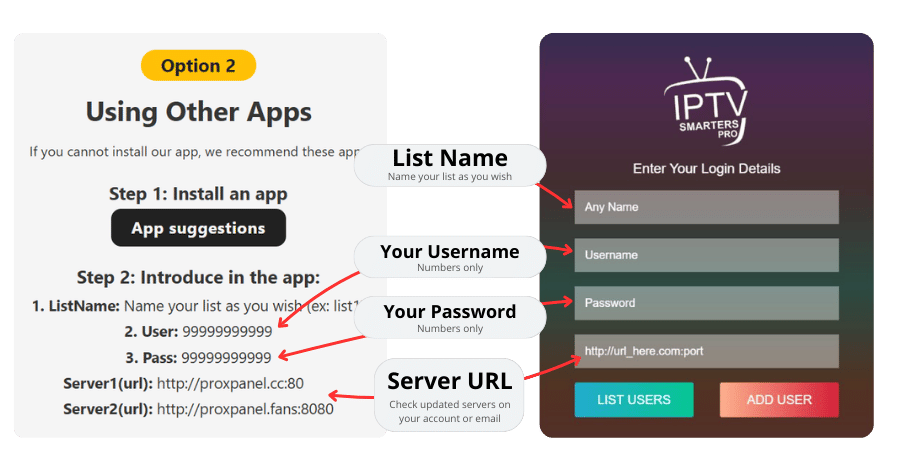
On screen above:
- Enter a Playlist Name (example: “My IPTV”)
- Introduce the Username we provided you
- Introduce the password we provided you
- On the server URL introduce one of this options:
Alternative server URL 1 -> http://proxpanel.cc:8080
Alternative server URL 2 -> http://proxpanel.fans:80
Step 3: Enjoy
After adding your playlist, you will see the main menu:
